
使用 OpenVINO™ 加速部署 MiniCPM-o-4.5 全模态模型
 openlab_96bf3613
更新于 9小时前
openlab_96bf3613
更新于 9小时前
引言
MiniCPM-o-4.5 是 OpenBMB 最新推出的端到端全模态(omnimodal)模型,基于 SigLip2 + Whisper-medium + CosyVoice2 + Qwen3-8B 构建,总参数量仅 9B。它在 OpenCompass 8 大视觉语言基准上平均得分 77.6,视觉能力超越 GPT-4o、接近 Gemini 2.5 Flash,同时支持双语实时语音对话、语音克隆,以及开创性的全双工多模态实时流式交互(同时看、听、说,无阻塞)。
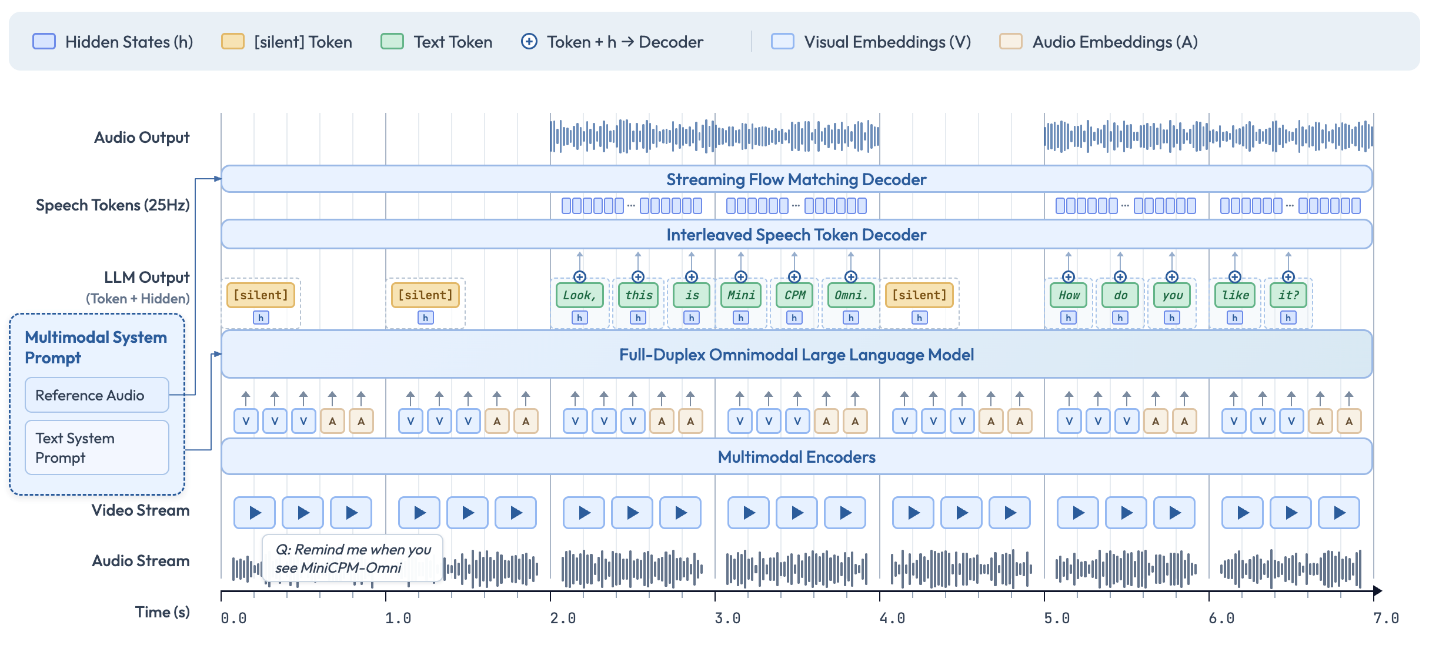
本文将详细介绍如何使用 Intel® OpenVINO™ 工具套件优化和部署 MiniCPM-o-4.5 模型,将其 15 个子模型全部转换为 OpenVINO™ IR 格式并进行 INT4/INT8 量化,在 Intel CPU/GPU 平台上实现高效推理。
第一步 环境准备
基于以下命令即可完成 Python 环境安装(推荐使用虚拟环境)。
Bash
python -m venv py_venv./py_venv/Scripts/activate.bat
Python
from pip_helper import pip_install# Install in batches to avoid pip resolver conflicts# Batch 1: PyTorch (with CPU index URL)print("Installing PyTorch...")pip_install("-q","torch==2.8.0","torchvision==0.23.0","torchaudio==2.8.0","--extra-index-url","https://download.pytorch.org/whl/cpu",)# Batch 2: OpenVINO stackprint("Installing OpenVINO and transformers...")pip_install("-q","transformers==4.51.0","openvino>=2026.0.0","openvino-tokenizers>=2026.0","nncf>=2.16",)# Batch 3: Audio, UI, and utility packagesprint("Installing audio, UI, and utility packages...")pip_install("-q","Pillow","librosa","soundfile","gradio==6.0.0","accelerate","einops","onnxruntime","hyperpyyaml","librosa","minicpmo-utils>=1.0.5","setuptools<82","onnx",)print(" All dependencies installed successfully!")
(额外工具脚本可从 OpenVINO™ notebooks 仓库下载 notebook_utils.py、pip_helper.py 和 gradio_helper.py)
第二步 模型转换和量化
MiniCPM-o-4.5 由 15 个子模型组成(LLM、视觉编码器、音频编码器、TTS 各模块等)。这些模型的作用分别是:
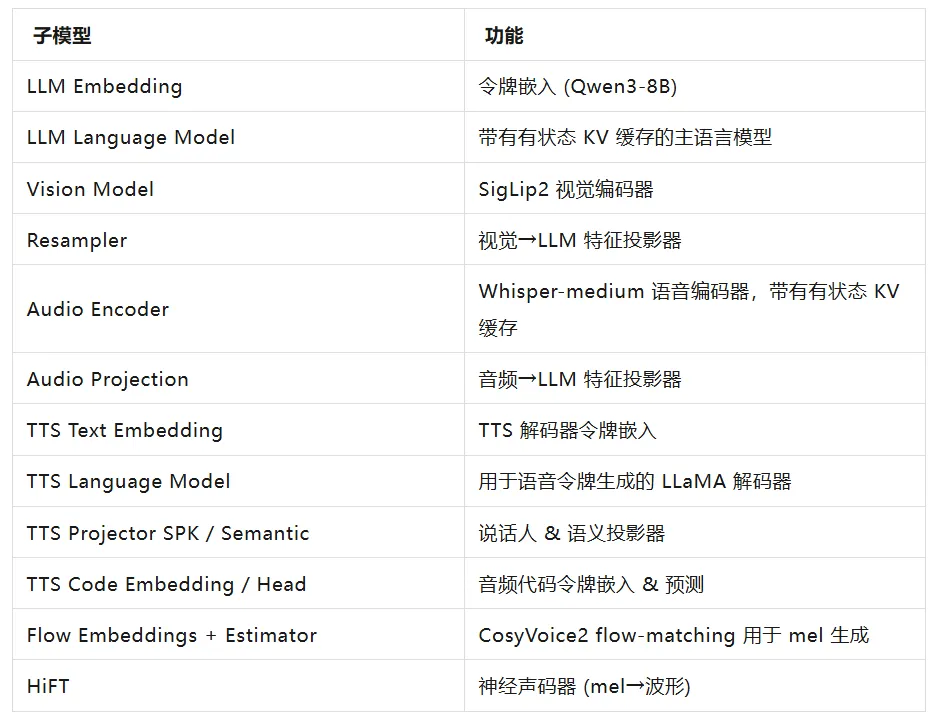
我们使用 minicpm_o_4_5_helper 提供的转换函数一键完成 OpenVINO™ IR 导出与量化:
-
LLM:INT4 对称量化(group_size=64, ratio=1.0)
-
Vision:INT8 对称量化
-
Audio Encoder:启用 stateful KV cache(高效流式)
-
其余小模型:保持 FP16(体积小,无需量化)
转换命令如下(首次运行会自动下载原模型并转换):
Python
from pathlib import Path# Path to the original model (downloaded from HuggingFace/ModelScope)model_id = "openbmb/MiniCPM-o-4_5"# Output path for converted OpenVINO modelsov_model_path = Path("MiniCPM-o-4_5-OV")from minicpm_o_4_5_helper import convert_minicpmo_modelif not (ov_model_path / "openvino_llm_embedding_model.xml").exists():# Quantization config:# - "vision": INT8 for vision encoder (moderate compression)# - "llm": INT4_SYM with group_size=64, ratio=1.0 for LLM (best quality/size)# - "text": No quantization for other text/audio/TTS modelsquantization_config = {"vision": {"mode": "int8_sym",},"llm": {"mode": "int4_sym","group_size": 64,"ratio": 1.0,},"text": None,}convert_minicpmo_model(model_id=model_id,output_dir=str(ov_model_path),quantization_config=quantization_config,use_stateful_apm=True, # Export Audio Encoder with stateful KV cache)print(" All 15 sub-models converted successfully!")else:print(f" Converted models already exist at {ov_model_path}")
第三步 模型部署
转换完成后,直接使用 minicpm_o_4_5_helper 中的 OVMiniCPMO 类即可加载 OpenVINO™ 优化模型,进行多模态推理(视觉聊天、语音 ASR、半双工/全双工流式、实时语音对话等)。完整 Pipeline 初始化和推理流程如下(直接来自 notebook 示例):
-
模型初始化
Python
from minicpm_o_4_5_helper import OVMiniCPMOov_model = OVMiniCPMO(model_path=str(ov_model_path),device=device.value,tts_device=tts_device.value,)
-
多模态 Chat 示例(单图 + 文本)
Python
from PIL import Imageimport requestsfrom io import BytesIO# Download a sample imageimage_url = "https://github.com/openvinotoolkit/openvino_notebooks/assets/29454499/d5fbbd1a-d484-415c-88cb-9986625b7b11"response = requests.get(image_url, timeout=30)image = Image.open(BytesIO(response.content)).convert("RGB")question = "What is in the image?"msgs = [{"role": "user", "content": [image, question]}]answer = ov_model.chat(msg***sgs,use_tts_template=False,)print(answer)
-
多轮对话示例(支持上下文记忆):
Python
# Multi-turn: follow up on the previous image# Reset LLM state for fresh generationov_model.llm._ov_language.reset_state()ov_model.llm._past_length = 0msgs = [{"role": "user", "content": [image, "What is in this image?"]},{"role": "assistant", "content": [answer]},{"role": "user", "content": ["What season do you think this picture was taken in? Why?"]},]answer2 = ov_model.chat(msg***sgs,use_tts_template=False,enable_thinking=False,)print(answer2)
-
音频理解示例(ASR / 说话人分析):
Python
import librosaimport numpy as npimport soundfile as sffrom IPython.display import display, Audioaudio_path = "assets/system_ref_audio.wav"audio_input, _ = librosa.load(str(audio_path), sr=16000, mono=True)print(f" Audio loaded: {len(audio_input)/16000:.1f}s @ 16kHz")# Display input audioprint(" Input Audio:")display(Audio(audio_input, rate=16000))# Reset LLM stateov_model.llm._ov_language.reset_state()ov_model.llm._past_length = 0# ASR task (aligned with original model README)task_prompt = "Please listen to the audio snippet carefully and transcribe the content."msgs = [{"role": "user", "content": [task_prompt, audio_input]}]asr_result = ov_model.chat(msg***sgs,do_sample=True,max_new_tokens=512,use_tts_template=True,temperature=0.3,)print("ASR Result:", asr_result)
-
半双工实时语音对话:
通过将用户音频分割为1秒长的块,并通过流式处理管道依次处理这些块,来模拟实时语音交互。模型会听取所有块,然后生成文本(并可选地生成音频)响应。
Python
import librosaimport numpy as npimport torchimport soundfile as sffrom IPython.display import display, Audioov_model = ov_model.as_duplex()# Set reference audio for voice styleref_audio_path = "assets/system_ref_audio.wav"ref_audio, _ = librosa.load(ref_audio_path, sr=16000, mono=True)# Example system msg for English Conversationsy***sg = {"role": "system","content": ["Clone the voice in the provided audio prompt.",ref_audio,"Please assist users while maintaining this voice style. Please answer the user's questions seriously and in a high quality. Please chat with the user in a highly human-like and oral style in English. You are a helpful assistant developed by ModelBest: MiniCPM-Omni",],}# You can use each type of system prompt mentioned above in streaming speech conversation# Reset stateov_model.reset_session(reset_token2wav_cache=True)ov_model.init_token2wav_cache(prompt_speech_16k=ref_audio)session_id = "demo"# First, prefill system turnov_model.streaming_prefill(session_id=session_id,msgs=[sy***sg],omni_mode=False,is_last_chunk=True,)# Here we simulate realtime speech conversation by splitting whole user input audio into chunks of 1s.# Use the system reference audio as a demo input (replace with your own audio file)user_audio, _ = librosa.load("assets/system_ref_audio.wav", sr=16000, mono=True)IN_SAMPLE_RATE = 16000 # input audio sample rate, fixed valueCHUNK_SAMPLES = IN_SAMPLE_RATE # sampleOUT_SAMPLE_RATE = 24000 # output audio sample rate, fixed valueMIN_AUDIO_SAMPLES = 16000total_samples = len(user_audio)num_chunks = (total_samples + CHUNK_SAMPLES - 1) // CHUNK_SAMPLESfor chunk_idx in range(num_chunks):start = chunk_idx * CHUNK_SAMPLESend = min((chunk_idx + 1) * CHUNK_SAMPLES, total_samples)chunk_audio = user_audio[start:end]is_last_chunk = chunk_idx == num_chunks - 1if is_last_chunk and len(chunk_audio) < MIN_AUDIO_SAMPLES:chunk_audio = np.concatenate([chunk_audio, np.zeros(MIN_AUDIO_SAMPLES - len(chunk_audio), dtype=chunk_audio.dtype)])user_msg = {"role": "user", "content": [chunk_audio]}# For each 1s audio chunk, perform streaming_prefill once to reduce first-token latencyov_model.streaming_prefill(session_id=session_id,msgs=[user_msg],omni_mode=False,is_last_chunk=is_last_chunk,)# Let model generate response in a streaming mannergenerate_audio = Trueiter_gen = ov_model.streaming_generate(session_id=session_id,generate_audio=generate_audio,use_tts_template=True,enable_thinking=False,do_sample=True,max_new_tokens=512,length_penalty=1.1, # For realtime speech conversation mode, we suggest length_penalty=1.1 to improve response content)audios = []text = ""output_audio_path = "output_realtime.wav"if generate_audio:for wav_chunk, text_chunk in iter_gen:audios.append(wav_chunk)text += text_chunkgenerated_waveform = torch.cat(audios, dim=-1)[0]sf.write(output_audio_path, generated_waveform.cpu().numpy(), samplerate=24000)print("Text:", text)print(f"Audio saved to {output_audio_path}")display(Audio(generated_waveform.cpu().numpy(), rate=24000))else:for text_chunk, is_finished in iter_gen:text += text_chunkprint("Text:", text)
-
全双工模式:
在全双工模式下,模型可以同时监听和说话,实时处理多模态输入(视频帧 + 音频块)。这是最先进的交互模式,非常适合需要AI在用户仍在说话时就做出响应的实时对话。
Python
import librosaimport torchfrom minicpmo.utils import generate_duplex_video, get_video_frame_audio_segmentsfrom IPython.display import display, Video# Ensure duplex mode for full duplex APIov_model = ov_model.as_duplex() if hasattr(ov_model, "as_duplex") else ov_model# Load video and reference audiocn_video_path = "assets/omni_duplex1.mp4"ref_audio_path = "assets/HT_ref_audio.wav"en_video_url = "https://github.com/user-attachments/assets/f6ab8ed5-5829-4ce2-9feb-3a8bf7374dbb"en_video_path = "assets/omni_duplex_en.mp4"try:resp = requests.get(en_video_url, timeout=30)resp.raise_for_status()if not resp.content:raise ValueError("Downloaded file is empty.")with open(en_video_path, "wb") as f:f.write(resp.content)video_path = en_video_pathprint(f" en_video downloaded: {cn_video_path}")except Exception as e:video_path = cn_video_pathprint(f" Download failed, fallback to {cn_video_path}\n{e}")ref_audio, _ = librosa.load(ref_audio_path, sr=16000, mono=True)ov_model.reset_session(reset_token2wav_cache=True)# Extract video frames and audio segmentsvideo_frames, audio_segments, stacked_frames = get_video_frame_audio_segments(video_path, stack_frames=1, use_ffmpeg=True, adjust_audio_length=True)# Prepare duplex session with system prompt and voice referenceov_model.prepare(prefix_system_prompt="Streaming Omni Conversation.",ref_audio=ref_audio,prompt_wav_path=ref_audio_path,)results_log = []timed_output_audio = []# Process each chunk in streaming fashionfor chunk_idx in range(len(audio_segments)):audio_chunk = audio_segments[chunk_idx] if chunk_idx < len(audio_segments) else Noneframe = video_frames[chunk_idx] if chunk_idx < len(video_frames) else Noneframe_list = []if frame is not None:frame_list.append(frame)if stacked_frames is not None and chunk_idx < len(stacked_frames) and stacked_frames[chunk_idx] is not None:frame_list.append(stacked_frames[chunk_idx])# Step 1: Streaming prefillov_model.streaming_prefill(audio_waveform=audio_chunk,frame_list=frame_list,max_slice_nums=1, # Increase for HD mode (e.g., [2, 1] for stacked frames)batch_vision_feed=False, # Set True for faster processing)# Step 2: Streaming generateresult = ov_model.streaming_generate(prompt_wav_path=ref_audio_path,max_new_speak_tokens_per_chunk=20,decode_mode="sampling",)if result["audio_waveform"] is not None:timed_output_audio.append((chunk_idx, result["audio_waveform"]))chunk_result = {"chunk_idx": chunk_idx,"is_listen": result["is_listen"],"text": result["text"],"end_of_turn": result["end_of_turn"],"current_time": result["current_time"],"audio_length": len(result["audio_waveform"]) if result["audio_waveform"] is not None else 0,}results_log.append(chunk_result)print("listen..." if result["is_listen"] else f"speak> {result['text']}")# Generate output video with AI responses# Please install Chinese fonts (fonts-noto-cjk or fonts-wqy-microhei) to render CJK subtitles correctly.# apt-get install -y fonts-noto-cjk fonts-wqy-microhei# fc-cache -fvgenerate_duplex_video(video_path=video_path,output_video_path="duplex_output.mp4",results_log=results_log,timed_output_audio=timed_output_audio,output_sample_rate=24000,)# Play the generated videodisplay(Video("duplex_output.mp4", embed=True, width=640))
全双工模式输出效果如下:视频

总结
本文详细介绍了如何使用 OpenVINO™ 部署 MiniCPM-o-4.5 全模态模型。OpenVINO™ 为其提供了显著的性能提升(INT4/INT8 量化 + stateful KV cache),特别适合在 Intel CPU/GPU 上进行边缘部署,实现实时多模态交互。作为领先的轻量全模态模型,MiniCPM-o-4.5 在 Intel 平台上展现出极高的实用价值。
参考资源
立即尝试 OpenVINO™ 加速版 MiniCPM-o-4.5,开启全双工多模态智能体验!
OpenVINO 小助手微信 :OpenVINO-China
如需咨询或交流相关信息,欢迎添加OpenVINO小助手微信,加入专属社群,与技术专家实时沟通互动。